Introduction: Unlocking Lean Workflow Engines with Monday.com Automations
I used to spend Monday mornings chasing updates, pinging owners, and stitching together status from Slack threads and spreadsheets. The breakthrough came when I turned those same follow-ups into Monday.com automations: suddenly, work moved on its own, handoffs were consistent, and cycle times started to fall—without adding headcount.
Busywork hides bottlenecks. Monday.com automations turn tasks into a lean, trigger-driven engine—standardized handoffs, fewer errors, faster cycles. Here’s what changes when you make the shift:
- Replace follow-ups: triggers move work, ping owners, and escalate before SLAs (service-level agreements) slip—no manager chasing updates.
- Standardize at scale: recipes enforce ownership, dates, and guardrails across teams, without IT (information technology).
- Cut errors and rework: one source of truth syncs tools and updates; cleaner audit trails.
- Shorten lead times: auto-route and surface blockers; cycle times fall.
- Visibility: dashboards and exception alerts free hours and reduce firefighting.
If you want a quick look at how this works in practice, try a short walkthrough here: Monday.com quick demo.
Designing Trigger-Based Workflows to Replace Manual Follow-Ups and Reduce Errors
Manual follow-ups tax cycle time and credibility. Trigger-based workflows in Monday.com turn status changes into automatic handoffs, so work moves without you.
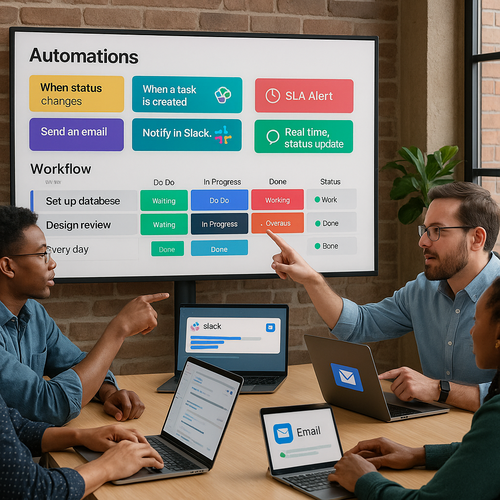
- Standardize if/then: when status hits Ready, auto-assign, set SLA, notify, and update the next board.
- Guardrails cut errors: required fields and clear owners stop bad handoffs and create audit-ready trails.
- Dashboards surface risk early: aging items and SLA risks appear before they escalate.
- No-code rules fit teams: rules match how teams work, so IT isn’t the bottleneck.
Skim a 2‑minute patterns brief or a short Monday demo—quick insight, no commitment. The payoff: 20–30% faster cycles, fewer escalations, and leaders freed from chasing updates.
Standardizing Processes and Accelerating Cycle Times Without Adding Headcount
Speed scales when work flows the same way every time. Standardized boards, templates, and Monday automations create predictable handoffs and compress cycle times—no extra headcount.
- Triggers replace pings: owners update with SLAs and due dates.
- Templates enforce fields: guardrails reduce errors and rework.
- Cross‑board mirroring: one source of truth; leaders see blockers in real time.
- End-to-end routing: automations move work across email, Slack, and your CRM (customer relationship management); waits shrink from days to hours and context switching drops.
Want the pattern, not a project? A 10‑minute Monday walkthrough or newsletter offers the blueprint—just clarity. Start here: see Monday.com in action.
Enhancing Visibility, Governance, and Cross-Team Collaboration with No-Code Automation
No-code automation on Monday.com turns scattered updates into shared, audit-ready flow. You get instant visibility and lightweight governance without adding headcount.
- Real-time dashboards: surface SLAs and bottlenecks so leaders stop chasing status.
- Triggered alerts and approvals: replace manual pings; missed handoffs drop.
- Standardized fields and owners: reduce errors and rework across teams.
- Unified audit logs and permissions: keep auditors comfortable by default.
- Native integrations: push handoffs across email, Slack, and CRM with context.
Result: faster cycle times and fewer escalations. Want relief in 10 minutes? Grab the weekly workflow teardown—practical Monday.com recipes and metrics, no sales pitch.
Finding Relief: How Practical Monday.com Automations Free Leadership and Scale Operations
Practical Monday.com automations act like a lightweight workflow engine: triggers standardize handoffs, signals replace status meetings. Leaders get their calendar back while operations scale without headcount.
Owners, SLAs, and guardrails stop stalls; errors and rework fall. Auto nudges and escalations replace pings; cycle time shrinks—often within a week. Unified boards create a single source of truth; leaders watch signals, not chase updates. No‑code setup sticks fast; audit trails by default. Integrations route alerts across Slack, email, and CRM—without sprawl.
For a calm path, skim a 10‑minute use‑case demo or our weekly field notes—fewer meetings, faster throughput, predictable execution. When you’re ready, explore how it fits your team: get started with Monday.com.