Introduction: From Firefighting to Focused Action with Real-Time ERP Alerts
I used to start Mondays buried in reports, coffee in one hand and a highlighter in the other, triaging late orders and surprise stockouts. The turning point came when we stopped scanning Enterprise Resource Planning (ERP) reports and started getting real-time, owner-routed Slack alerts. The firefighting faded; the right people saw the right issues immediately, and momentum shifted from reactive to proactive.
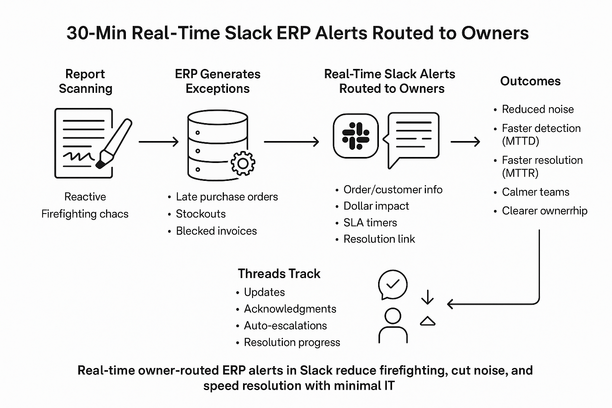
Firefighting fades when ERP exceptions become real-time, owner-routed Slack alerts. Instead of scanning reports, your team sees only what changed—and who owns it—now.
Alerts carry context: order/customer, dollar impact, promise date, and next best action. Mean Time To Detect (MTTD) and Mean Time To Resolve (MTTR) fall as threads track updates and auto-escalations surface stalled work. Noise drops with thresholds, deduping, and filters—even with imperfect data. Go live in about 30 minutes on late Purchase Orders (POs), stockouts, and blocked invoices; no heavy Information Technology (IT).
Outcome: calmer weeks, faster recovery, clear ownership.
Why Real-Time Slack ERP Alerts Transform Exception Management
Real-time Slack ERP alerts turn exceptions into owner-routed signals. Latency vanishes; decisions speed up.
Each exception routes to the right channel with owner tag, Service Level Agreement (SLA), and ERP link—e.g., backorder risk to Demand Planning. Noise stays low with thresholds, dedupe, and severities—only action-needed events fire. MTTR shrinks as detection is instant and threaded updates make handoffs visible; leaders monitor trends, not dispatch. Setup takes about 30 minutes: connect a query or webhook and map roles to owners—no heavy IT.
Setting Up Effective ERP-to-Slack Exception Routing in 30 Minutes
Skip report-chasing. In 30 minutes, route ERP exceptions to accountable owners in Slack to shrink fire drills and MTTR.
- Define the signal: pick one high-impact query (late Purchase Order (PO) > 48 hours or stockout < 2 days), dedupe, tag severity—trusted, not noisy.
- Map ownership: routing table (Stock Keeping Unit (SKU)/plant/customer → role/person/channel) assigns and backstops; leaders stop dispatching.
- Enrich alerts: add record link, SLA clock, one-click actions; resolution starts in-channel.
- Escalate with intent: 15‑minute no‑acknowledgment to team, 60‑minute to manager; threads track MTTR.
Start narrow, prove value, then expand to adjacent exception types with the same routing and escalation pattern.
Cutting Noise and Driving Accountability: Making Alerts Work for Your Teams
Noisy ERP alerts turn leaders into dispatchers. Replace spray-and-pray pings with owner-routed Slack signals that show up only when action matters.
- Smart thresholds, dedupe, and quiet hours strip 60–80% noise; only business-impact breaches fire.
- Auto-assign to the Directly Responsible Individual (DRI) with context (order, customer, value at risk), right in the thread.
- SLA timers with simple, one-click escalation cut MTTR and executive interruptions.
- 30-minute, low-IT setup, with a feedback loop that tunes false positives.
As teams see cleaner signals and clearer ownership, they spend less time debating and more time resolving.
Gain Instant Relief: Access the Impruver University Walkthrough & Template
In 30 minutes, turn noisy ERP reports into owner‑routed Slack signals. Spot exceptions early, assign instantly, cut recovery time and leader firefighting—no heavy IT.
Alerts arrive with context—who, what, SLA impact, and a deep link—so action starts, not debate. Routing rules by plant, SKU, customer, or value tag accountable owner automatically. Thresholds, dedupe, and quiet hours curb noise without missing the critical few. Threads show closure and escalations; MTTR and SLA adherence become measurable.
Grab the Impruver University walkthrough and drop‑in template to go live fast; Lyaxis can tailor the pattern. Want examples and updates? Join our newsletter to see how—optional code 15off.