Introduction: Rethinking Inspection to Work Order Automation via Email
I’ve sat with technicians at the end of long shifts, watching them retype photos, notes, and asset details into a CMMS (Computerized Maintenance Management System). It slows everything down and strips away valuable context. The simplest fix didn’t require a new platform or a costly integration—it was the email inbox we already owned. When inspections flow to email and into tickets, the work starts faster and audits get cleaner.
What if retyping dropped to zero? Email is the quiet bridge you already own—turn inspection evidence into ready-to-work orders without heavy integrations.
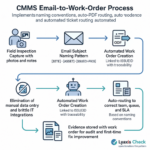
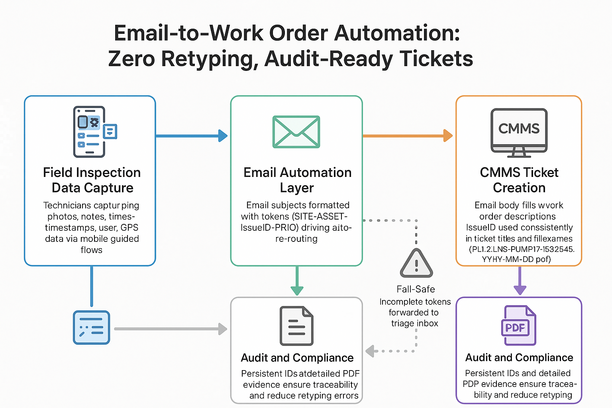
- Subject: use SITE-ASSET-IssueID-PRIO (priority) so CMMS (Computerized Maintenance Management System) rules route to the right queue and SLA (Service Level Agreement).
- Auto-generate a PDF: create a PDF (Portable Document Format) for each finding with photos, timestamps, and inspector, then attach it for audit-ready tickets.
- Tag the body: include Asset ID (identifier), location, and cost center to avoid misroutes.
- Keep the IssueID consistent: include the IssueID (issue identifier) in the work order (WO) title and description to close the loop.
Our newsletter shares field-tested templates; Lyaxis Check implements them via email—no integration project. Outcome: faster WOs, zero retyping, cleaner audits, minimal change.
Streamlining CMMS Intake: Auto-PDF Routing and Naming Conventions
Retyping kills speed and traceability. Route inspection PDFs by email so CMMS tickets open with evidence, named to your rules.
- Subject tokens drive auto-routing: [PLANT-2][LINE-3][MECH] sends to the right asset, location, and team.
- Consistent names boost search and audits: PLT2-LN3-PUMP17-ISS2345_2026-08-11.pdf.
- Link the IssueID everywhere: include it in the subject, filename, and CMMS field to preserve lineage from finding to fix.
- Set a safety net: if tokens are missing, auto-forward to a triage inbox for quick tag-and-send.
Lyaxis Check rides your intake, auto-PDFs and names to your convention—no integration; our newsletter unpacks the token sets. Result: faster work orders, cleaner audits, less admin.
From Field to Ticket: Eliminating Retyping with Email-to-Work Order Workflows
Retyping field notes into your CMMS drains time and strips context. Email-to-work order turns each inspection email into a structured ticket—no portals, no copy-paste.
- Use subject tokens like SITE-ASSET-ISSUE: auto-fill fields; the email body becomes the description; priority can default if missing.
- Name photos with asset + timestamp: attachments auto-convert to a PDF for an Evidence section that satisfies audits.
- Templates add SLAs: SLAs (Service Level Agreements) set expectations; the IssueID persists to close for traceability.
- Routing rules: standardize naming and prevent misfires.
Curious? Lyaxis Check rides your email intake; our newsletter shares vendor-agnostic patterns and edge cases—tools second. Outcome: faster tickets, cleaner audits, less downtime.
Practical Relief with Lyaxis Check: Simplifying Mobile Inspections and Compliance
Inspections shouldn’t create admin; they should trigger work via the CMMS you use.
- Guided capture in the field: techs capture photos and notes in guided flows with automatic time/user/GPS (Global Positioning System) stamps.
- Evidence PDF to your intake: Lyaxis Check builds an evidence PDF (Portable Document Format) and emails it to your CMMS intake with the name: Site-Asset-IssueID-Priority.
- Subject and tags map to CMMS fields: the IssueID becomes the ticket key and evidence auto-attaches.
- Routing rules prevent misfires: teams see a searchable, complete trail.
Prefer relief? Lyaxis Check handles the email-to-ticket plumbing; our newsletter shares naming templates and routing plays first, partners later. Result: faster work orders, fewer errors, time back.
Get Lyaxis Check for Android to put these email-to-work order patterns in your team’s hands without a heavy integration.
Beyond Automation: Building Audit-Ready Reports and Long-Term Maintenance Efficiency
Automation matters when reports are audit-ready and planners can act. Route field findings straight into your CMMS inbox to drop retyping to zero and accelerate work orders.
- Email-to-ticket: mobile capture formats the subject and body for intake and auto-attaches a PDF with photos.
- Naming conventions: use [Site]-[Asset]-[IssueID]-[Priority]-[Date] so rules route correctly and searches work.
- Persistent IDs: the inspection IssueID follows the work order (WO) and closeout, preserving lineage for audits.
- Fail-safes: bounce detection, retries, CC (carbon copy) planners, and a send log tighten compliance.
Want practical patterns? Our newsletter shares them; Lyaxis Check quietly makes them real—no heavy integration. Result: faster tickets, clean evidence, time back.