Introduction: Streamlining Month-End with QuickBooks to Monday.com Integration
After more than a few month-ends that stole my Saturdays, I finally connected QuickBooks to Monday.com and watched the weekend fire drills fade. Bills stopped bouncing between inboxes and spreadsheets, and the team had clear ownership without me chasing updates. That shift—from manual juggling to a predictable close—made the difference between surviving the month and running it.
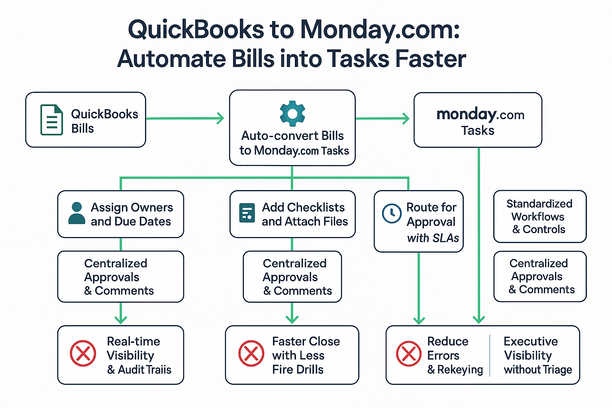
Month-end shouldn’t require weekend heroics. Connecting QuickBooks to Monday.com turns bill chaos into a predictable close. Bills auto-convert to tasks with owners, due dates, and checklists—no copy-paste or rekeying. Approvals, comments, and files centralize; SLAs (service-level agreements) hold and email chains fade. Real-time statuses and blockers surface for CEOs (chief executive officers) without dragging them into triage. Standardized workflows preserve controls and audit trails, even as processes change. Cleaner data accelerates payments and eases reconciliation.
The Pain of Manual Bill Processing and Its Impact on Finance Operations
Manual entry, email approvals, and spreadsheets turn finance operations into bottlenecks. The cost: slower closes, higher risk, and burned-out teams.
- Cash flow drag as discounts slip; fire drills rise.
- Errors from rekeying; reconciliations stall.
- Leadership blind spots; blockers stay hidden.
- Fragile DIY (do-it-yourself) automations erode audit confidence.
It doesn’t have to stay this way—auto-convert QuickBooks bills into Monday tasks with owners, due dates, and checklists to centralize approvals and files. The next section shows how to make that shift.
Transforming Bills into Action: Automating QuickBooks Tasks in Monday.com
Month-end stalls when bills bounce between tools. Turn each QuickBooks bill into a Monday.com workflow that assigns, routes, and syncs back—automatically.
- Auto-create items with owner, due date, and checklist; no copy-paste.
- Route approvals with SLAs (service-level agreements) and nudges; keep comments and files with the bill.
- Two-way sync to QuickBooks; live visibility and audit trail.
- Exceptions reach executives; finance avoids weekend crunch.
Want the playbook, not a pitch? Our newsletter unpacks the pattern, and an Impruver University tutorial walks the build (code 15off optional). If you’d like to see it done, Lyaxis can wire it in. Result: faster close, fewer handoffs, cleaner controls.
Boosting Visibility and Accountability While Cutting Close Times
When QuickBooks bills auto-become Monday tasks with owners, due dates, and checklists, visibility goes live and close cycles calm. Dashboards and audit trails replace guessing.
- Bottlenecks by SLA; CEOs see blockers without triage.
- Ownership is explicit; approvals, comments, and files live in one place.
- Duplicate entry ends; errors fall; reconciliations stop slipping.
- Controls hold via standardized workflows and audit logs.
- Close drops by days; vendors are paid on time.
Gain operating-model insights via the Lyaxis newsletter; when it clicks, Lyaxis can wire it end-to-end. Prefer hands-on? See the Impruver University walkthrough (code 15off optional). Net: visibility up, close time down.
Next Steps: Practical Automation Insights with Impruver University and Ongoing Support
If your close still depends on copy‑paste between QuickBooks and Monday, you’re paying a tax. Automation removes triage while preserving controls.
- Bills auto-land in Monday with owners, due dates, and checklists; approvals, comments, and files stay attached.
- CEOs get real-time visibility into blockers; finance keeps executives out of triage.
- Standardized AP (accounts payable) flows cut rekeying, errors, and audit gaps.
- For low-pressure ideas, skim Lyaxis’ newsletter for patterns teams use to eliminate handoffs: https://lyaxis.com/category/newsletter/.
- Ready to try it safely? Impruver University’s hands-on tutorial and templates walk you through; office hours (code 15off optional): https://university.impruver.com/?aff=lyaxis.
Takeaway: Start small; close faster without hiring.