I learned the hard way that email is where momentum goes to die. As our team scaled, my inbox ballooned, and so did the number of hidden commitments. The fix wasn’t heroic willpower—it was designing a system where emails instantly became trackable work, with clear owners and deadlines. Once we paired our inboxes with Monday.com and aimed for true Inbox Zero, I finally got executive control back without adding headcount.
Why Inbox Zero Is Critical for Scaling Leaders: The Hidden Cost of Email Overload
Every extra email taxes speed and hides commitments. Inbox Zero isn’t tidiness—it’s leverage. When messages linger in the inbox, they pile up as invisible work, slow decision cycles, and create risk you only discover when a customer escalates. Clearing the inbox to zero by converting messages into visible, owned tasks unlocks faster throughput and steadier execution.
Seamless Email-to-Task Automation: Turning Gmail and Outlook Messages into Monday.com Workflows
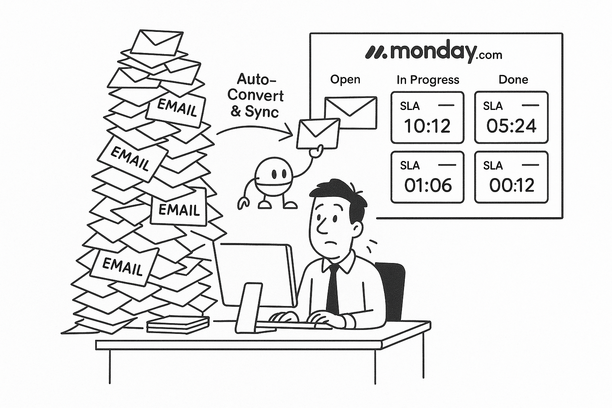
- Convert to work: Auto-convert Gmail/Outlook emails to Monday.com items via add-ons with an owner, due date, and service-level agreement (SLA) tags; the inbox stops hoarding tasks.
- Two-way truth: Use two-way synchronization (two-way sync) so you can reply in either the inbox or Monday.com; updates mirror in both places, eliminating double entry.
- SLA routing: Labels and categories route requests to the right board and start the response-time clock; risks surface earlier.
If you want a lightweight place to start, I used a simple starter setup in Monday.com to trial this approach and saw immediate gains. You can explore Monday.com here: Monday.com.
Enforcing Accountability: Using SLA Tags and Two-Way Sync to Prevent Missed Commitments
Accountability fails in the inbox. SLA tags plus two-way Gmail/Outlook–Monday.com sync turn threads into reliable delivery.
- One source of truth: Emails become Monday.com items with a clear owner, “SLA-by” date (service-level agreement deadline), and the original context.
- Proactive safeguards: Timers and automations trigger reminders and executive visibility before breaches, not after.
- Real-time alignment: Replies sent from Gmail/Outlook update the item; status changes in Monday.com mirror back to the thread.
The outcome: fewer escalations, faster replies, and reclaimed focus.
Operator Insights: A Mini-Case on Gaining Executive Control Without Adding Headcount
In one rollout, a 25-person Customer Success (CS) team routed renewals and Very Important Person (VIP) customer requests from labeled emails straight into Monday.com. Within a month, they cut missed SLAs (service-level agreements) by 60% and hit true Inbox Zero. Leaders stopped trawling threads; they reviewed response-time dashboards and item queues. The team won back hours each week and used them for proactive outreach instead of firefighting.
Start Experimenting Today: Practical Steps to Integrate Your Email with Monday.com for Smarter Workflow
- Start tiny: Map one label or category to a single board so tagged emails auto-create items.
- Auto-own and SLA: Set a default owner and due date so potential breaches surface early.
- Keep the thread alive: Enable two-way sync so replies mirror in both places, ending duplicate entry.
- Prove it fast: Pilot on a shared mailbox (for example, support@); watch response-time and throughput.
- Expand safely: Add one more label; then route by domain or keyword as patterns emerge.
For a concise blueprint—including checklists, patterns, and where to add SLA tags and sync—see Lyaxis’ newsletter: Lyaxis Newsletter. When you’re ready to operationalize, spin up a simple starter board in Monday.com to test the flow: Monday.com.
Fewer missed commitments, calmer inboxes, steadier throughput—the path to executive control starts with turning every relevant email into trackable work and letting the system keep score for you.